
Writer by Sanjoy gorh
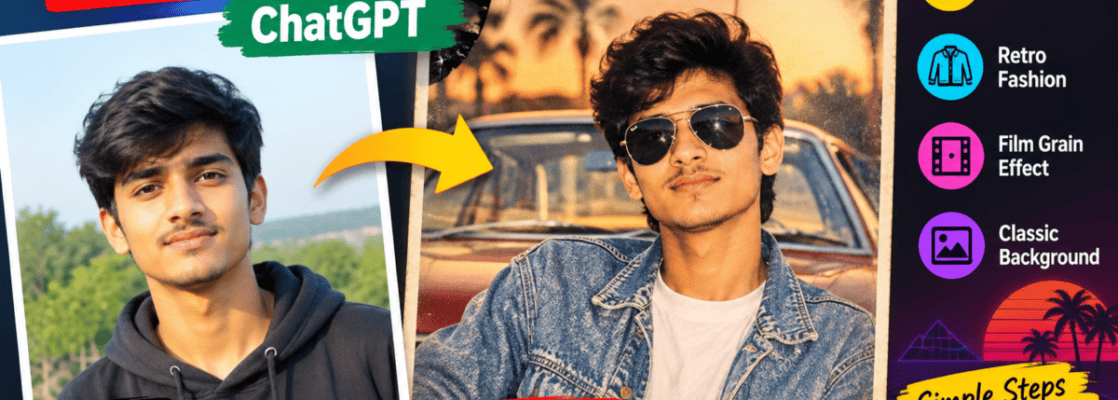
The 1980s AI photo trend has become a popular way to transform modern photos into nostalgic, retro-style images. With AI image tools such as ChatGPT, you can recreate the visual feeling of the 1980s without needing professional photo-editing software.
People are using prompts to add vintage clothing, old-camera effects, classic hairstyles, film grain, neon colors and retro backgrounds to their photos.
Based on the search questions in your provided data, the main user intent is clear: people want to know what the 80s ChatGPT prompt is, how to make an 80s photo, how to create a retro look, and how to transform an old or modern photo into an 80s-style image.
This guide explains the process in simple steps and gives you ready-to-use prompts.
What Is the 1980s AI Photo Trend?
The 1980s AI photo trend is a style of AI image generation or editing that makes a photograph look as if it was taken during the 1980s.
The effect can include:
- Vintage film grain
- Slightly faded colors
- Warm skin tones
- Retro clothing
- 1980s hairstyles
- Neon lights
- Old cars
- Classic bedrooms or streets
- Flash photography
- Analog-camera imperfections
- VHS-inspired textures
- Soft focus and film-like contrast
The goal is not simply to add an old filter. A good AI prompt describes the camera style, lighting, clothing, environment, colors and overall mood.
How to Make an 80s Photo in ChatGPT
Creating an 80s-style image can be simple if you are using an AI image generator that supports photo editing.
Step 1: Choose Your Photo
Start with a clear photo. A front-facing portrait works particularly well, but you can also use group photos, outdoor pictures or full-body photographs.
For the best result, use an image where the face is clearly visible.
Step 2: Upload the Photo
Upload your picture to ChatGPT or another AI image tool that supports image editing.
Then explain exactly how you want the photo changed.
Instead of writing only:
“Make this photo look 80s.”
give the AI more useful visual instructions.
Step 3: Use a Detailed 1980s Prompt
Try this ready-to-use prompt:
1980s AI Photo Prompt:
Transform this photo into a realistic 1980s-style photograph while preserving the person’s identity, facial features, natural skin texture and pose. Give the image an authentic vintage 1980s atmosphere with period-appropriate clothing, hairstyle and background. Use analog film photography, subtle film grain, slightly faded colors, natural flash, soft highlights, realistic shadows and a nostalgic old-camera look. Make it look like a genuine photograph taken in the 1980s, not a modern image with a simple retro filter. Keep the result realistic and natural.
This prompt gives the AI several important details instead of relying on the word “retro” alone.
Best 80s ChatGPT Prompt for a Portrait
If you want a stronger portrait-style effect, try:
Create a realistic 1980s portrait from this photo. Preserve the person’s facial identity and natural proportions. Add authentic 1980s fashion, hairstyle and accessories that suit the person. Use an analog 35mm film camera aesthetic, direct camera flash, subtle grain, slight color fading, soft contrast and natural skin texture. Place the subject in a believable 1980s environment with period-appropriate details. Avoid modern objects, modern clothing, excessive smoothing and artificial-looking effects.
This works particularly well when you want the picture to resemble an old family photograph or studio portrait.
How to Make a Photo Look More Retro
A common mistake is asking AI for “retro” without explaining what kind of retro appearance you want.
For a convincing result, mention specific characteristics.
Camera
Ask for:
- 35mm film photography
- Analog camera
- Vintage flash photography
- Slight lens imperfections
- Film grain
Colors
You can request:
- Faded colors
- Warm tones
- Slightly muted contrast
- Vintage color grading
Environment
Consider adding:
- 1980s bedroom
- Old city street
- Retro arcade
- Vintage diner
- Classic car
- Old shopping mall
- 1980s school or studio setting
Clothing
For example:
- Denim jacket
- High-waisted jeans
- Oversized shirt
- Vintage sweater
- Retro sportswear
- Period-appropriate accessories
The more specific your visual direction, the easier it is for an AI image model to understand the desired style.
80s Photo Prompt for Instagram
If your goal is an Instagram-style retro image, you can use:
Turn this photo into a realistic 1980s-inspired Instagram portrait. Preserve the person’s identity and facial features. Add authentic 1980s fashion, vintage hairstyle, analog 35mm film texture, subtle grain, direct flash photography and slightly faded colors. Create a nostalgic but stylish composition inspired by real 1980s photography. Avoid excessive effects, plastic-looking skin, unrealistic facial changes and modern objects.
This creates a nostalgic appearance while keeping the image relatively natural.
Can AI Convert an Old Photo Into a New-Looking Photo?
Yes. AI image tools can also be used for the opposite process: improving an old photograph.
For example, an old image may have scratches, faded colors, low resolution or damaged areas. An AI editing prompt can ask the model to restore the photograph while keeping the original person’s identity.
Try:
Restore this old photograph while preserving the person’s identity, facial features, clothing and original composition. Repair visible scratches and damaged areas, improve clarity and contrast, restore natural colors and carefully enhance details without making the face look artificial. Keep the result realistic and faithful to the original photograph.
Restoration and 80s-style generation are different tasks. Restoration tries to repair an existing photograph, while an 80s prompt usually tries to create or recreate a particular visual style.
Why Is the 80s Photo Trend Popular?
The popularity of the trend is partly connected to nostalgia and the visual appeal of analog photography.
Modern smartphone photos are generally sharp, clean and highly processed. Vintage photographs have imperfections that can make them feel more personal.
Film grain, flash, faded colors and older clothing can create the impression of a genuine memory rather than a digitally perfect photograph.
The trend also gives younger users a way to experiment with an era they may not have experienced themselves.
How to Get Better Results From an AI Prompt
A simple prompt can work, but a structured prompt usually gives you more control.
Include these five elements:
1. Subject: Who or what is in the picture?
2. Era: 1980s, early 1980s or late 1980s.
3. Environment: Where should the photograph appear to have been taken?
4. Photography: Film camera, flash, grain, lighting and lens characteristics.
5. Restrictions: Tell the AI what should remain unchanged.
For example, if editing someone’s photograph, explicitly ask the tool to preserve their identity and facial features.
Common Mistakes to Avoid
Don’t overload the prompt with dozens of unrelated effects. A realistic retro photograph should still look like a photograph.
Avoid asking for:
- Extremely heavy VHS effects
- Excessive film grain
- Unrealistic skin
- Completely different facial features
- Modern clothing with a vintage background
- Too many neon effects
- Artificial-looking backgrounds
If the first result isn’t right, change one or two details rather than rewriting the entire prompt.
Frequently Asked Questions
What is the 80s ChatGPT prompt?
There isn’t one official “80s ChatGPT prompt.” You can create an effective prompt by describing 1980s clothing, environments, analog photography, film grain, lighting and colors while telling the AI what parts of the original photo should remain unchanged.
How do I make an 80s photo in ChatGPT?
Upload a suitable photo and ask the image tool to transform it into a realistic 1980s photograph. Include details such as vintage clothing, 35mm film, flash photography, film grain and period-appropriate surroundings.
Can AI make my photos look retro?
Yes. AI image-editing tools can change the visual style of a photograph to create a retro or vintage appearance.
How do I make a photo look like it was taken in the 1980s?
Use a prompt that combines period-appropriate clothing and surroundings with analog-camera characteristics such as film grain, direct flash, faded colors and realistic film texture.
Final Takeaway
The 1980s AI photo prompt trend is more than simply adding a vintage filter. The strongest results come from describing the entire visual scene: fashion, hairstyle, location, lighting, camera type, film texture and color treatment.
If you want a realistic result, also tell the AI to preserve the person’s identity and avoid excessive digital effects. You can then adjust individual elements—such as clothing, background or lighting—until the image matches the 1980s style you want.